Problem with Displaying Ads
Why can't I see ads in my application?
-
Check your SDK integration.
Make sure that ad show method is called after SDK initialization. Remember that ads need some time to be loaded, so we recommend to call show method at least 15 seconds after initialization (excluding banners, they are displayed right after they are loaded).
Refer to the testing guide to review your integration: Android, iOS, Unity
-
Make sure that you use correct Bundle ID + App Key.
A unique Appodeal Key (App Key) is created for each app in Appodeal. It has to be used for receiving ads in the application with the same Bundle ID specified in app settings with this App Key.
-
If you see test ads instead of live ads:
Make sure that:
-
There is no code for enabling test mode in your integration code
Appodeal.setTesting(true);/[Appodeal setTestingEnabled:YES]; -
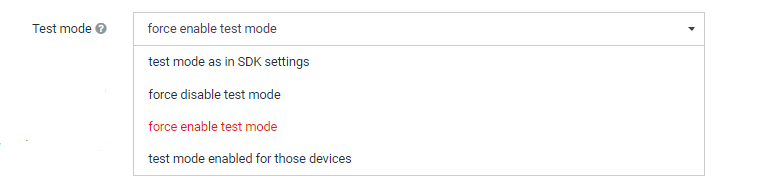
"Force enabled test mode" is not chosen in app settings:
-
Traffic limit (2000 impressions) is not exceeded for unpublished apps.
-
-
If live ads were displaying some time ago, but after some tests stopped to display, try to reset ad ID on your device.
Android:
- Go to your device's Google Settings.
- Select Ads.
- Select Reset advertising ID.
- Press OK.
iOS:
- Go into your device's Settings.
- Select Privacy.
- Select Advertising.
- Select Reset Advertising Identifier.
If you can't establish the reason for why live ads are not being displayed correctly, please contact our support team and describe the issue in detail, specifying your App Key.